Skip to content

Toyota Previa 2017 Key Fob & Car Keys

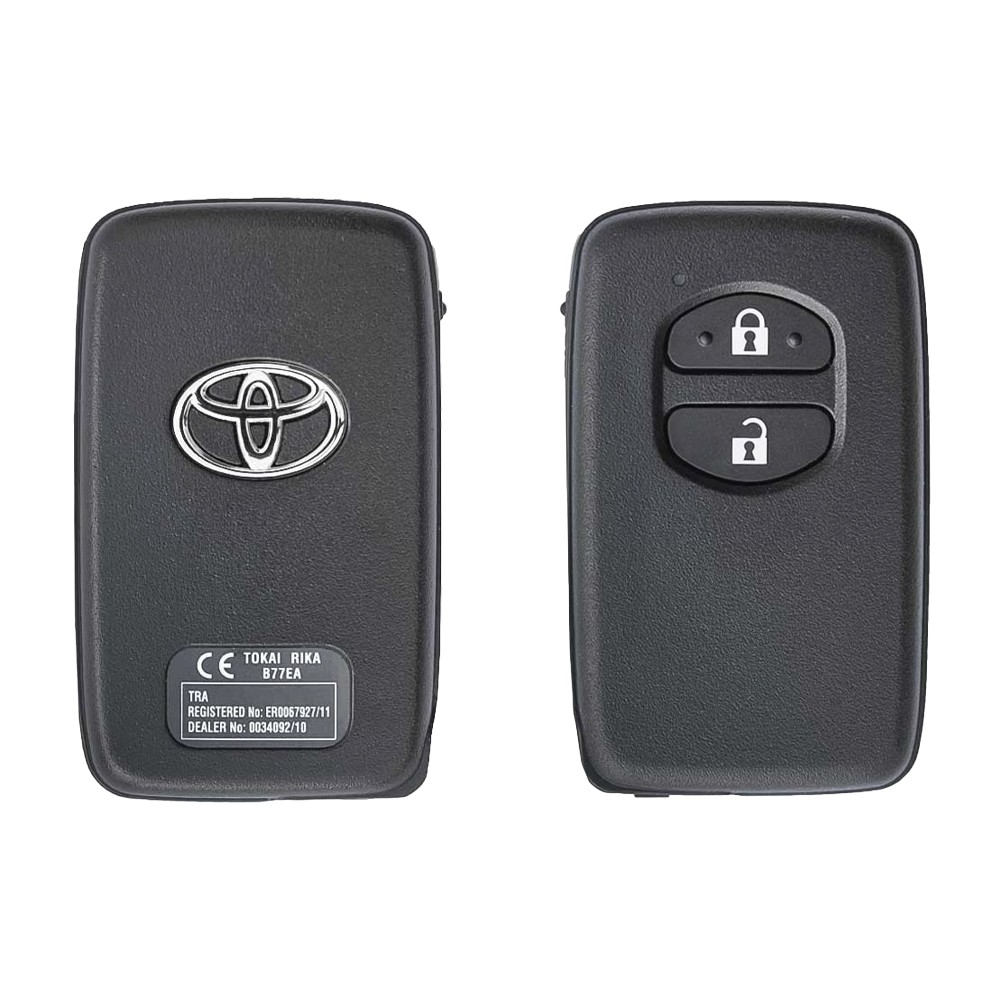
Keys that fit the 2017 Toyota Previa: smart keys, 2 buttons, 8A (H-chip) or Texas Crypto DST 40 bits (TMS37126) chip, 433 MHz. 2 compatible keys, remotes & shells (genuine and aftermarket) available for the 2017 Toyota Previa.

Last updated: 17 November 2026

Key specifications for the Toyota Previa 2017

Key types
smart keys
Frequency
433 MHz
Buttons
2-button
Transponder chip
8A (H-chip) · Texas Crypto DST 40 bits (TMS37126)

To pick the right part, match the part number or FCC ID printed on your original remote, or listed in the Toyota parts catalogue, with the specifications on each listing. Every remote listed for the Toyota Previa 2017 transmits on 433 MHz.

A new smart key or remote has to be programmed to the car with a key programmer, and when every key is lost the programming is still done through the diagnostic port. We ship the key worldwide from the UAE by DHL and FedEx; any automotive locksmith or the dealer can cut and program it.

Programming the Toyota Previa 2017 key

Smart key (push to start)

5 tools list this key. 5 of them list all keys lost.

Programming steps

Add key - Autel MaxiIM IM508 / IM608(GCC / Europe cars)

Needs: working smart key, new smart key for the car, internet connection (if the tool asks for the data backup)

  1. Connect the VCI to OBD. IMMO > Toyota > select the model > Smart key > Keyless system (CAN).
  2. If the tool asks for it, run Back up IMMO data first (online) and save the file.
  3. Add smart key: switch the ignition on with the working key, follow the prompts (ignition off, hazard lights on where asked).
  4. Hold the working key to the Start button until one beep, then the new key until two beeps.
  5. Switch on, touch a learned key to the Start button, then test start and the remote buttons.
Watch out: Bring every key the customer keeps; check the remote buttons on each after programming. The smart box has 5 key positions in the worked examples; erase unused keys if it is full.
Add key - Lonsdor K518ISE / K518S / K518 Pro(GCC / Europe cars)

Needs: working smart key, new smart key for the car

  1. Connect the K518 by OBD. Immobilizer > Toyota > Select from type > (smart key system) > Add smart key.
  2. Hold the working key to the Start button and press it until the dashboard lights flash.
  3. Within 30 s hold the new key to the Start button; remove it after two beeps.
  4. Wait for registration complete, then test start and the remote buttons.
Watch out: Bring every key the customer keeps; check the remote buttons on each after programming. The smart box has 5 key positions in the worked examples; erase unused keys if it is full.
All keys lost - Autel MaxiIM IM508 / IM608(GCC / Europe cars)

Needs: APB112 smart key simulator, XP400 (IM508), new smart key for the car (OEM or Xhorse / Autel universal), internet connection, no PIN entry (data read by OBD)

  1. Connect the VCI to OBD (and the APB112 to the tablet). IMMO > Toyota > select the model > Smart key > Keyless system (CAN).
  2. Back up IMMO data (online): the tool reads the smart box EEPROM by OBD; save the file.
  3. Generate simulator key: load the saved file, confirm the key type, connect the APB112 and let it be written.
  4. Hold the APB112 against the Start button and press Start: the dashboard comes on.
  5. Add smart key: say yes to using the simulator; hold the APB112 to the Start button until one beep, then the new key until two beeps.
  6. Wait for Registering to finish, then test start and the remote buttons of the new key.
  7. If the customer wants the lost keys gone, delete the keys not present with the tool's key erase function.
Watch out: The car battery must be charged; the data backup needs an internet connection. The simulator / emulator is erased if you use the device for another key job before adding the key: add the new key straight after generating it. The smart box has 5 key positions in the worked examples; erase unused keys if it is full.
All keys lost - Lonsdor K518ISE / K518S / K518 Pro(GCC / Europe cars)

Needs: LKE 5-in-1 smart key emulator (older SKE emulators per chip type), new smart key for the car, no PIN entry (data read by OBD)

  1. Bind the LKE emulator to the K518 the first time you use it.
  2. Connect by OBD. Immobilizer > Toyota > Select from type > All smart key lost > Backup EEPROM (immo data) and save the file.
  3. Generate the emergency key: put the LKE in the K518 card slot and write it from the saved data.
  4. Hold the LKE to the Start button and press Start until the dashboard comes on.
  5. Add smart key: LKE (registered key) to the Start button until one beep, then within 30 s the new key until two beeps.
  6. Test start and remote; delete lost keys with Delete smart key if the customer wants them gone.
Watch out: The car battery must be charged; the data backup needs an internet connection. The simulator / emulator is erased if you use the device for another key job before adding the key: add the new key straight after generating it. The smart box has 5 key positions in the worked examples; erase unused keys if it is full.

Key with a blade (regular or flip)

3 tools list this key. 3 of them list all keys lost.

  • OBDSTAR Key Master G3
    • Add key
    • All keys lost
    • Remote
  • Launch X-431 IMMO
    • Add key
    • All keys lost
    • Add key
    • All keys lost

Key type not stated by the list

One tool lists this key.

When the key changed

Smart key (push to start)

  • 2008 - 2017This yearChip: 4D433 MHz(GCC / Europe cars)Page 94 smart key (89904-28250)

Key with a blade (regular or flip)

  • 2003 - 2010Chip: 4D-67433 MHzBlade: TOY43(GCC / Europe cars)Late cars may carry a G or H key; read the key first

Check coverage first: support depends on the tool's software version and the exact model. A tool that is not shown here may still cover this car.

Frequently asked questions

Which keys fit the Toyota Previa 2017?

2 listings fit the Toyota Previa 2017: smart keys, in 2-button versions. Match the part number or FCC ID printed on your original key with the specifications on each listing.

What frequency does the Toyota Previa 2017 remote use?

Every remote listed for the Toyota Previa 2017 transmits on 433 MHz.

Which transponder chip does the Toyota Previa 2017 key use?

The listings for this car carry: 8A (H-chip) · Texas Crypto DST 40 bits (TMS37126). Check the chip in each listing's specifications.

Which tools program a Toyota Previa 2017 key?

The tool makers' coverage lists name OBDSTAR Key Master G3, Autel IM608 II / IM608 Pro II, Lonsdor K518, Xhorse VVDI Key Tool Max, Xhorse VVDI Key Tool Plus and Launch X-431 IMMO for this car; 6 of them list all keys lost. Check your tool's latest coverage list before the job.