Skip to content
  1. Home
  2. Auto Key Programming
  3. Hardware
  4. Openport 2.0 Compatible J2534 Pass-Thru ECU Flash Cable - OBD2 · CAN & K-Line · EcuFlash Tuning Interface - Aftermarket · New
Openport 2.0 Compatible J2534 Pass-Thru ECU Flash Cable - OBD2 · CAN & K-Line · EcuFlash Tuning Interface - Aftermarket · New

Openport 2.0 Compatible J2534 Pass-Thru ECU Flash Cable - OBD2 · CAN & K-Line · EcuFlash Tuning Interface - Aftermarket · New

Aftermarket

SKU: B05391

$42.13
AED  149.98

In Stock

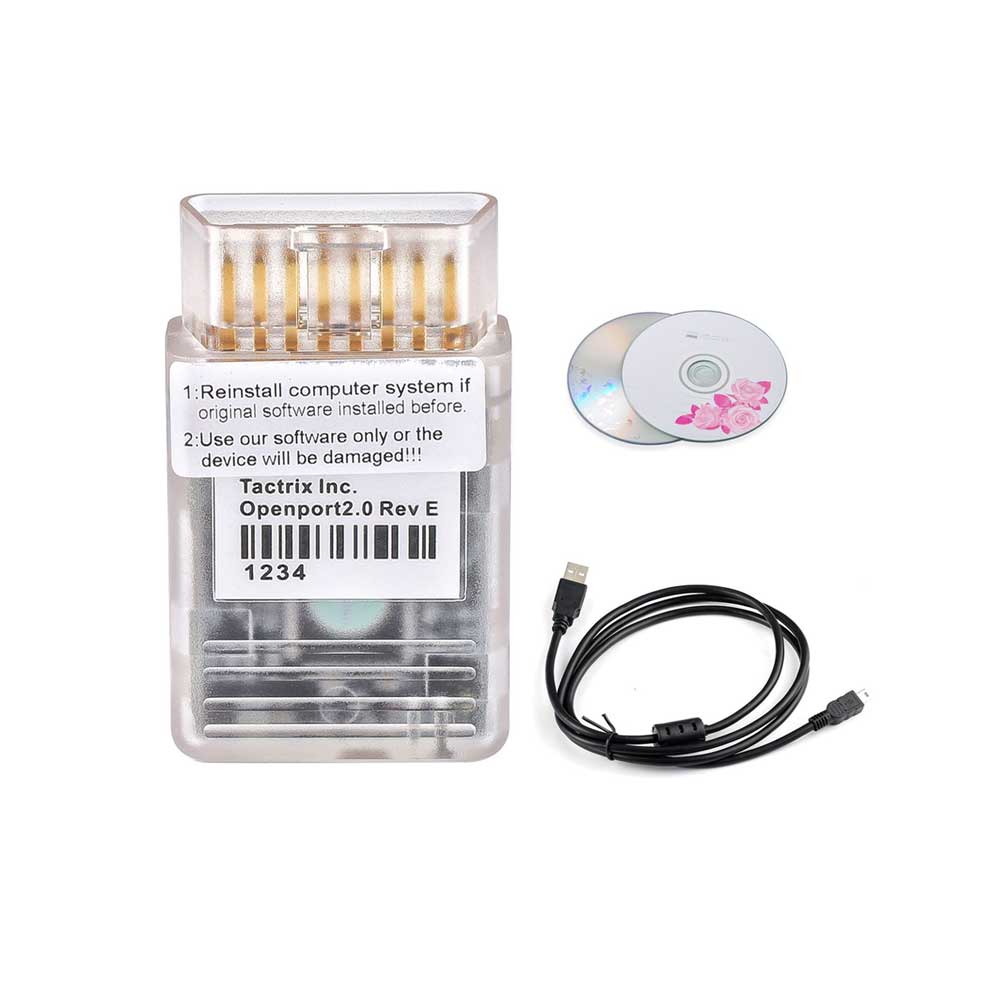
Openport 2.0 compatible J2534 pass-thru interface for ECU reflashing, tuning and OBD2 diagnostics. CAN and K-line, USB 2.0, standalone microSD logging.

Specifications

Aftermarket · New

Openport 2.0 Compatible J2534 Pass-Thru ECU Flash Cable - OBD2 Tuning & Diagnostic Interface

J2534-1 pass-thru interface · CAN and K-line · USB 2.0 · EcuFlash-compatible · standalone SD data logging

J2534-1
Pass-thru standard
USB 2.0
PC connection
CAN + K-line
Protocols
microSD
Standalone logging

⭐ This is an Openport 2.0 compatible J2534 pass-thru interface for ECU reflashing, tuning and OBD2 diagnostics, built to the same pinout and USB interface as the original design and used with EcuFlash and other J2534-1 compliant software. It connects to the vehicle's 16-pin OBD-II port and to a Windows PC over USB 2.0, handling CAN (ISO 15765) and K-line (ISO 9141, ISO 14230 / KWP2000) traffic. It is supplied as a compatible aftermarket unit, not a manufacturer-branded product.

⚙️ Key features

J2534-1 pass-thru interface

Presents a standard J2534-1 pass-thru API to Windows, so it works with software written to that standard rather than to one vendor's proprietary protocol.

CAN and dual K-line support

Handles CAN 2.0 / ISO 15765 and K-line traffic under ISO 9141 and ISO 14230 (KWP2000), covering both modern and older ECU communication on the same cable.

Standalone data logging

Logs to a microSD or microSDHC card without a laptop attached, so a road-test log can be captured with the cable left plugged into the OBD port.

Auxiliary I/O

Carries configurable auxiliary input pins and a 2.5 mm auxiliary connector for logging external sensor data alongside the ECU stream.

💎 Benefits

One cable across several jobs

Reflashing, live diagnostics and road-test logging run through the same interface, so a workshop does not need a separate logger and a separate flashing rig.

Software freedom

Because it speaks the J2534-1 standard rather than a closed protocol, it is not tied to one vendor's subscription software.

Low cost of entry to tuning work

Gives a locksmith or performance shop a route into ECU flashing and datalogging without committing to a manufacturer diagnostic platform.

👥 Who it's for

Performance tuners

Shops reflashing and datalogging Subaru and Mitsubishi ECUs with EcuFlash and similar J2534 tools.

Diagnostic technicians

Technicians needing a standards-compliant pass-thru cable for CAN and K-line ECU communication.

Independent workshops

Garages adding ECU reflash and datalogging capability without buying into a single manufacturer's platform.

🧰 Supported coverage

ECUFLASH Widely used with EcuFlash for Subaru (WRX, STI, Forester, Legacy, Baja) and Mitsubishi (Evolution I–X, 2G DSM, 3000GT) ECU reflashing and datalogging -
J2534 SOFTWARE Usable with software written to the J2534-1 pass-thru standard - coverage depends entirely on the software, not on the cable -
PROTOCOLS CAN 2.0 / ISO 15765, ISO 9141, ISO 14230 (KWP2000), dual K-line -
Vehicle coverage comes from the software you run, not from this cable. Check the specific tuning or diagnostic application's own supported-vehicle list and its stated J2534 device requirements before committing to a paid job.

📦 What's included

✅ IN THE BOX

✔ Openport 2.0 compatible J2534 pass-thru interface with integrated OBD-II connector

✔ USB-A to Mini-USB PC cable

❌ NOT INCLUDED

✘ EcuFlash or any tuning software - downloaded separately from its own publisher

✘ microSD card for standalone logging - sold separately

✘ Vehicle-specific ECU definition files - sourced separately

📋 Specifications

🔌 INTERFACE
Standard
J2534-1 pass-thru
PC connection
USB 2.0 full speed, Mini-USB
Vehicle connection
OBD-II 16-pin
Auxiliary
Configurable I/O pins + 2.5 mm connector
🛠️ PROTOCOLS
CAN
CAN 2.0 / ISO 15765
K-line
ISO 9141, ISO 14230 (KWP2000), dual K-line
Logging
Standalone to microSD / microSDHC
Firmware
Field-upgradeable
📦 PHYSICAL
Condition
New, aftermarket
Origin
Aftermarket compatible unit
Host OS
Windows
Weight
200 g

🛠️ How to use

🔑SETUP - J2534 PASS-THRU

This is a pass-thru interface, not a standalone scan tool: it needs a Windows PC running J2534-compliant software before it can do anything on a vehicle.

Install the driver and software install the J2534 pass-thru driver on the Windows PC, then install the tuning or diagnostic application you intend to use, such as EcuFlash.
Connect and power up plug the interface into the vehicle's 16-pin OBD-II port and into the PC over USB, then switch the ignition on so the ECU is awake and reachable.
Read before you write read and save the vehicle's original ECU map to disk before making any change, so there is a known-good file to return to if a write is interrupted.
Flash and verify run the write with vehicle voltage held stable, then re-read the ECU and road-test before returning the vehicle to the customer.
Verify coverage first: supported vehicles, ECU types and definition files come from the software you run, not from this interface - check the application's own compatibility list before quoting a job.

Frequently Asked Questions

Common questions about this product

No. It is an aftermarket interface built to the same Openport 2.0 design and pinout, supplied and supported as a compatible unit rather than a manufacturer-branded product. It presents a standard J2534-1 pass-thru interface to any compliant Windows software you choose to run.
The cable itself supports none directly. Vehicle coverage is decided by the J2534 software you run and the definition files loaded into it, so check that particular application's own supported-vehicle list carefully before quoting or starting any paid job on a customer car.
It is designed for use with EcuFlash, which is the application most commonly paired with this interface for Subaru and Mitsubishi ECU reflashing and datalogging. EcuFlash itself is downloaded separately from its publisher and is not supplied with the cable.
It handles CAN 2.0 under ISO 15765, plus K-line traffic under ISO 9141 and ISO 14230 (KWP2000), including dual K-line. That combination covers both current CAN-based ECUs and the older K-line systems still found on many workshop vehicles.
Yes. It logs to a microSD or microSDHC card on its own, so a road test can be recorded with the cable left plugged into the OBD-II port and no PC in the vehicle. The card itself is sold separately.
An interrupted write can leave the ECU in a non-starting state that needs recovery. Always save the original map first, hold vehicle voltage stable with a charger, and keep the USB connection undisturbed for the whole duration of the flash.
Yes. It is a pass-thru interface rather than a standalone scan tool, so it needs a Windows PC with the J2534 driver installed and a compliant tuning or diagnostic application. On its own, plugged into a vehicle, it does nothing.

Last updated: 18 November 2026